


Nokia N97 Silver possesses latest technology and high tech features. The gadget works on 3G technology. For fast data transfer it follows various networks like 3G HSDPA, Bluetooth® with A2DP, Micro USB, EDGE and WLAN Wi-Fi UPnP. The device works on quad band and WCDMA technology, favoring world wide roaming. Internet can be browsed on WAP XHTML, HTML and RSS feed. The device has the capacity to store files and has the built in memory of 32 GB and a memory card option is also there which can add an additional card up to 16 GB. 5 MP camera along with Carl Zeiss Tessar™ Lens and dual flash helps to take clear and precise pictures. There is a second camera present in the handset which helps one to take his own picture without taking help of others and also helps to make video calls. The sliding phone slides out a full QWERTY keyboard making easier to type messages. OS Symbian Operating System and S60 5th Edition Software present in the gadget making it more special. Nokia N97 Silver is a multi functional handset.

A big problem of modern-day phones is their battery life, or better, their lack of it. After 1 or 3 days you need to plug it to a power-socket and most of the times when you're in the middle of an important conversation.
Here is where LG comes in. We had confirmation of a reliable source within LG, that the company is developing a phone that doesn't need to be recharged. That's about time!
Techniques
You're probably wondering how this is possible? Solar panels? Most probably, but solar juice isn't enough to power nowadays energy consuming phones. Luckily there are more techniques available. I'm using a Seiko Kinetic watch for many years now that uses kinetic energy instead of a battery. Why not using this technique in a phone? It gets enough action during the day to charge itself.
According to our source this new LG phone would be announced soon.

LG has made the announcement of the LG BL40 official and it is quite a remarkable phone. The BL40 is the fourth device in the Black Label series and is also called the new Chocolate phone.
The device has a very large touchscreen; 4 inch in an unusual 800 x 345 pixels resolution. The device is very long and thin at the same time. The aspect ration is 21:9 and this should give the device a panoramic and cinema-like experience.
Dual Screen UI
Another advantage of this long display is that it is possible to open two different windows at the same time. LG is calling this Dual Screen UI.
The new LG Chocolate is getting available in the third quarter of this year. Prices are still unknown.
Nokia 2220 possibly spotted, clearly has no XpressMusic aspirations
Though Nokia's well-known for its midrange and high-end handsets, the meat and potatoes operation might be the low end -- take the venerable 1100, for example, which is kind of a big deal seeing how it's the best-selling phone in history. That's why phones like this rumored 2220 here are important, even though it won't make much of a PR splash when Nokia finally gets around to announcing it. The sleek slider keeps things ultra-simple with a VGA cam and a dual-band GSM radio, but it still manages to pack a 3.5mm jack, Series 40 (as opposed to the bare-bones Series 30), and an FM tuner. Look for it this quarter in select markets if the insider info here pans out.

Nokia today announced the Nokia 6788, its first device for TD-SCDMA - China’s domestic 3G standard, at an event in Beijing. The Nokia 6788 is specifically designed for China Mobile’s network, featuring a 5-megapixel (2592 x1944) camera with a dual-LED flash, a 2.8″ QVGA display, and the hugely-successful Symbian S60 platform, the Nokia 6788 allows people to instantly share the things that matter to them most. The Nokia 6788 is expected to be available at the end of December 2009.
Nokia 6788 TD-SCDMA Specifications:
T-Mobile Announces Sony Ericsson Equinox with Customizable Light Effects The Sony Ericsson Equinox, available exclusively from T-Mobile, combines style and substance. Featuring external light effects and a customizable pulse light, this fashionable flip phone will have heads turning. In addition, the Equinox is a great companion while on the go with built-in A-GPS with available Location Based Services by TeleNav, a 3.2 megapixel camera with video capture, music and video player, stereo Bluetooth and an FM radio. Sony Ericsson Equinox Features Include: The Sony Ericsson Equinox will be available in October for $49.99 with a two-year service agreement and mail-in-rebate at select T-Mobile retail stores.
Folks in the Canadian province of Saskatchewan have another new touchscreen device up for grabs. SaskTel has launched the LG Bliss, which features a 3″ touchscreen, 2MP camera (with video), microSD expansion to 16GB, Bluetooth, speakerphone, voice dialing and much more. The Bliss will set customers back $99.00 on a 3-year contract, $179.00 on a 2-year contract, $259.00 on a 1-year, and the prepaid/monthly option goes for $323.00.
 Get the ultimate multimedia experience with Satio. Feast your eyes on movies, TV-series’ and video clips thanks to the 3.5 inch screen and crystal clear 16:9 widescreen format – just like watching them live. A friend pulling a funny pose? Snap them with the amazing 12.1 megapixel camera and share the picture with friends.
Panasonic has announced its latest and most compact Micro Four Thirds camera, theLumix GF1. The GF1 offers a 12-megapixel resolution with a 3-inch LCD viewfinder and an integrated flash. The camera stores images to SD/SDHC cards, and features optical image stabilization and a dust cleaning system to keep the sensor clear. This latest camera has 35% less volume and 26% lighter than the former G1. The GF1 has new techie features such as built-in flash and good focus speed. Micro Four Thirds is an extension of the Four Thirds standard that Olympus, Leica and Panasonic have used for their recent DSLRs. To mount existing Four Thirds lenses on this new compact Four Thirds camera there is an adapter ring available. In addition, the camera offers a new “My Color” mode with a selection of preset effects (like Retro, Monochrome, etc.) so users can quickly shift between color, saturation, and brightness levels, and a Live View function enables users to see how the My Color settings will look before they take a shot. The camera also sports nine Film modes, and a custom function lets users store their favorite settings for re-use. For point-and-shoot users, the camera offers a “peripheral defocus” feature that keeps the foreground in focus but blurs out the background—or vice versa—helping beginning photographers achieve greater depth of field. The Panasonic GF1 is available in four colours, black, red, silver and white, either body only (£570) or in two different kits, one with the new LUMIX G 20mm/F1.7 ASPH pancake lens (£800 / $900), and the other with the existing 14-45mm/F3.5-5.6 ASPH/MEGA O.I.S. zoom lens (£720 / $900).
JVC has introduced its latest pocket camcorder, the GC-FM1 Picsio. This latest deviceis a new smartphone-sized pocket camcorder with four video and image modes. It allows you to make 1440 x 1080p recordings at 30 frames per second and 3264 x 2448 images. Captured video are in MPEG-4 AVC/H.264 format which will be save in a SD/SDHC memory cards with capacity of up to 32 GB, then upload them to YouTube. Or iTunes. The GC-FM1 Picsio has also image stabilization that minimizes camera shake, even when the 4X digital zoom is used.Other specifications includes CMOS sensor, and HDMI connectivity. This latest gadget is available in three colors — Black Ice, Blue Steel and Purple Passion.
Philips is about to launch its latest Google Android powered smartphone, the Philips V808. The Philips V808 is their second Android powered handset and it comes with a 3.2 inch HVGA touchscreen display, a 3.2 megapixel camera, and microSD card support up to 8GB. Other techie features of this android device includes widget support and multimedia player including video and audio. The Philips V808 has a 1000 mAh battery which will likely last for several hours, and has a GSM/GPRS/EDGE for its connectivity. There is no word on pricing or availability, or any details when we might see the Philips V808 is the US and Europe.
Acer Corporation has introduced its latest monitor, the Acer S243HL. According to the company, this latest LCD monitor is the first LCD monitor in the market having a contrast of 8000000:1, with a resolution of Full HD 1920×1080. It is also the slimmest 24-inch widescreen display on the market,having a thickness of less than 15 millimeters. Moreover it has an integrated speaker located at the rack of the monitor,and also been equipped with the energy-saving white LED backlight. In comparison with traditional monitors, backlit CFFL, S243HL can reduce power consumption up to 63%.
Samsung has announced the birth of its latest mobile handset, the Samsung B7620 Giorgio Armani. This latest mobile phone of Samsung has a screen size of 3.5 inches, having a 16 million colors (65 thousand effective) resistive AMOLED touchscreen of WVGA resolution, a TouchWiz 2.0 UI, Work & Leisure mode switch key, an 8GB storage, a QWERTY keyboard, runs under Windows Mobile 6.5, and features a 360 degree spin capability, a delicate framework and construction. This latest technology has an ARM1176 CPU running at 800MHz coupled with 192MB of RAM. This uniquely styled, golden mobile phone also comes with a Giorgio Armani logo, and features a five-megapixel camera, an HSPA connectivity, a built-in GPS receiver, TV-out capabilities, Wi-Fi and Bluetooth connectivity options, DivX/XviD support. This mobile has a dimension of: height 118.5mm, width 58.3mm, and depth 16.4mm, with its weight 164gm. The Samsung B7620 Giorgio Armani has a price range of around $1,035.
Are you having a hard time finding things you’ve misplaced in the kitchen, under your bed, under the sink? Then this latest device is for you, the Flexible Snake Scope USB camera. This latest device is perfect for exploring the areas where the sun don’t shine thanks to its long, robust, semi-flexible insertion tube and adjustable dual white LEDs with adjustable brightness. It can snap images in VGA quality (640×480) in rich color. Both camera head and cable are waterproof, so go ahead, stick it into the sink drain and find your lost ring. In addition, there is no need for battery power since it draws electricity straight from a USB port. It comes with smart software that allows you to view, tweak and archive your findings. Archiving option is really great feature for professional people need to present their findings to the clients. You can get your USB Snakescope for $49 from Firebox.com.
Vizix has announced its latest video eyewear, the new Wrap 310 Video Eyewear. The new eyewear boasts the same functions as the visor-style displays offered by the company except in a sunglasses design. It features a widescreen displays with a 428×240 screen resolution which is said to match to viewing a 55-inch screen from approximately 10 feet away. It supports all 3D video formats and is compatible for connection with your portable DVD players, desktop computers, laptops, Blu-ray players, iPhone and iPod Models. It can be powered using two AA-size batteries which offers up to 6 hours of playback and can be found on the company’s website for $250.
If you are interested in forex trading I think it is time for you to start off by getting some good forex course or forex training.Forex Trading Course is a necessity for everybody who interested in this field. As you knew there are a lot of money is involved in this business. If we don’t have some forex trading knowledge or experiences that supposed we got from forex training, I am sure we will lose a lot of money. May be some of us not even know what is forex trading. Forex that stands for foreign exchange is basically exchange of currency between various countries. By doing this we hope gain some profit. To get forex trading course we can go through online and search from various online forex course. We can also get forex trading course from our local college campus. Online Trading Academy is well-known as an online services that offering forex trading course. Their online trading course is free and contains with many video tutorial that really helpful both for beginner and professional who want to get more knowledge in forex trading. I think their website is full with tools that we need if we want to involve in forex business. Online Trading Academy is also has every resource that we need whether in forex market, stocks and options. It is hard to find website that provide some kind of source that relatively complete for us.

Forex is the most important factor for any country. Forex reserve determines the status of the country. Forex or FX is the most important asset today. It is one of the greatest opportunity to make money. Forex Trading means trading in the currencies. In the FX market one currency is traded or exchanged with another currency. One of the Unique factors of the forex market is the volume of the trade that happens in the forex market. According to the latest estimates morethan 4 trillion US dollar per day.
Forex or Fx means Foreign Exchange. Forex trading is an excellent opportunity for investors to make money. Forex trading means buying or exchanging one currency with one another. Most important players here are Banks, Governments, Currency speculators, and other institutions.
There are many advantages of Forex trading. FX Trading gives you the greatest return on your investment.One of the greatest advantage of Forex trading is its high leverage margin. It allows you to trade hundred times more the amount you invest. It allows you to make an investment decision any time because the market is open 24 hours a day.

Many brokers in the Forex tradingoffer a demo account to their clients to ensure a smooth business in foreign trading. This is a kind of account that uses fake currencies and it is used to conduct virtual trades. You can avail this demo account for absolutely free. There are many advantages of having a demo account inForex trading. The most important benefit is that it shows conditions of the real market. In most cases, the brokers will open this demo account for their clients for a month, but there are other brokers who are often generous to the clients and keep this account open for as long as they want. This is of course to create an impression that the brokers are not just after money, but in fact they want to offer some genuine services as well to their clients.


Market has failed at 1.6000 area resistance with confidence now, be patient on the potential break. Overhead resistance is heavy above the 1.5750 area now with 1.5660 first; traders say offers extend into the 1.5800/30 area with stops above. Two-way trade at resistance to start on Monday suggests a deeper pullback is in the works. Strong long-liquidation break is still coming; test of the lows as expected Wednesday. Watch for two-way volatility. Be ready to add quickly if a rally happens; rate has BIG stops under the 1.5520 area and a break under the 50 bar MA could be swift. Rally after FOMC is a “head fake”; look for retreat within 24 hours.
Forex (Foreign Exchange) trading is nothing more than direct access trading of different types of foreigncurrencies. In the past, foreign exchange trading was mostly limited to large banks and institutional traders. However, recent technological advancements have made it so that small traders can also take advantage of the many benefits of forex trading just by using the various online trading platforms to trade.

Q: What is Online Forex Trading?
A: Online Forex Trading is a highly attractive marketplace that has a daily volume of $2.5 trillion dollars and has become the largest currency investment arena in the world.
Q: Can anyone send you Forex questions?
A: I will gladly address all your forex questions, in a friendly and simple manner. I will also provide a professional study of the most popular techniques implemented today by Forex traders worldwide. I also hope to offer useful and valuable background, including technical methods, trading tips, Forex glossary, chart reading, and financial indicators used in Fundamental Analysis.
ABOUT THE ONLINE FOREX TRAINING BLOG
As you will see by following my online forex tradingblog, my years of experience in Forex trading and Forex platform operation, parallel to Forex education, including seminars, printed publications and academic studies, will help you succeed in Forex too.
It's my goal that my experience be passed on to provide all levels of forex traders the training and the essentials of Forex trading.
With the help of my Online Forex Trading Blog, you will soon be ready to start trading Forex and making all the money you deserve. In fact, you can even start today, while beginning with small amounts and gradually obtaining the experience you need.
I wish you success in your forex trading, and hope you find my Online Forex Trading Blog interesting, helpful and enjoyable.


If you enjoyed this post, make sure you
http://feedburner.google.com/fb/a/mailverify?uri=FunWithBlog">
subscribe to my regular Email Updates!

2.navigate your way through layout - edit HTML-Tick expand widget template and search for
3.And paste the copied code beneath
4.Click on Save Template
5.Click View blog and enjoy.
Note:
It might be possible that the box might not appears in 1 try just use hit and try method.to find the right position comfortable to you..
Now that Blogger had introduced import blog and export blog, backing up and restoring your blog is very easy. Furthermore, links, embedded content, comments and photos is also easily backed up and restored with just a couple of clicks.
The Import & Export feature in Blogger is now live and can be accessed from the Settings tab(Basic) of your Blogger dashboard.
Import blog - Export blog - Delete blog
With "Export Blog," you can easily create a complete backup of your Blogger blog on to the hard drive and this may come handy in situations when you accidentally delete some old blog post or if Google blocks your blog due to policy violations – at least you’ll have a local copy of all the content that you may publish elsewhere.
Other that creating a safe backup, you may also use the export (followed by import) function to merge multiple blogs into one.
For some more detailed info on all of the things you can do with Import and Export, please check out Official Google accompanying help article.
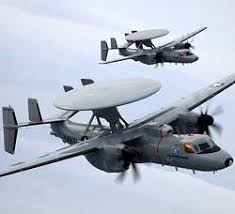
The US government has cleared yet another high technology system for India, the "futuristic" shipboard Hawkeye E-2D aircraft for Airborne Early Warning (AEW) and battle management.
The clearance has been described by diplomatic sources as a fallout of the "successful" visit of Secretary of State Hillary Clinton and the signing of the End User Monitoring Agreement (EUMA) of military equipment being supplied or sold by the US to India.
Like the Boeing P 8I Maritime Multi-mission Aircraft (MMA), of which the Indian Navy has already ordered eight aircraft, the Hawkeye E-2D is the very latest and is yet to be delivered to the US Navy.
India is the second country after the UAE to be cleared by the US State and Defense Departments for sale of this sophisticated system. The US Navy has sanctioned $432 million for trials of the aircraft, currently underway at the Naval Air Station Patuxent River in Maryland. The Naval Systems Command (NAVAIR) based there provides engineering and testing support for new naval systems and weapons.
The Hawkeye E-2D has been under the US government's consideration for India for some time. In fact, in 2007, Pentagon sources in Washington had told this writer that the aircraft was being cleared, but apparently the previous version, Hawkeve E-2C, was eventually offered to which the Indian Navy said "No" in informal discussions.
The aircraft is being manufactured by Northrop Grumman, a leading US player in Aerospace, Warships, Missiles, Combat Radars and Electronic Warfare systems.
Northrop Grumman's programme Manager for International Business Development Tom C. Trudell told India Strategic magazine that the aircraft has "just been cleared by the US government for India" and that a presentation was made to the Indian Navy in August in New Delhi.
Indian Navy officers had witnessed the capabilities of the Hawkeye E-2C but told the US officials that as the equipment it would buy would be used for years, it must be the best and the latest with future capability insertion potential.
India Strategic quotes unnamed Indian officials as saying that the technology onboard the Hawkeye E-2D is "very tempting" and that although neither the Gorshkov aircraft carrier which India is buying from Russia nor India's first aircraft carrier indigenously being built would be able to accommodate this aircraft, India's future aircraft carriers could be a little bigger.
"By the time this aircraft comes, and by the time the Indian Navy gets used to it from initial shore-based operations, plans for two more aircraft carriers could be amended to house this system."
There have been no tenders of RfPs yet for the Hawkeye E-2D, but then companies from worldwide present their wares to various countries either by themselves and at their own cost, or make offerings in response to Request for Information (RfI) which are floated in routine by all the armed forces to know what is available in terms of newer generation of systems.
Future aircraft carriers of the Indian Navy would also have to be equipped with catapult launching systems, for which it is already looking around. India's second and third aircraft carriers should have this facility along with lifts and adequate open area for what is called free deck takeoff.
The Mig 29Ks that the Indian Navy is buying for Gorshkov, will be launched by a ski ramp.
Tip to tip, the Hawkeye is a bigger aircraft than the Mig 29.
Trudell said that although Northrop Grumman had been allowed to make presentations to the Indian Navy, its sale would have to be direct between the Indian and US government under the Foreign Military Sales (FMS) programme. There are many systems on board, developed for US Navy, which only the US government can clear for transfer to other countries.
The US Navy has initially ordered five Hawkeye E-2Ds under a Low Rate Initial Production (LRIP) programme, and the first aircraft should be delivered to the US Navy in 2011.
India can get the aircraft within three years of a contract being signed, said Trudell.
Repeater operates at the physical layer of the OSI layers model and it is not such as intelligent device like the switches and routers that perform the smart routing based on the MAC and IP addresses of the source and destination computers. Repeaters are also used in the broadcasting, where they are known as the relay transmitters and boosters. Repeaters restrengthen the data signals in the telecommunications. Normally a repeater consists of the following things. In a fiber optic network, a repeater consists of the following. Fiber optic repeaters are less expensive and operate at low power. A repeater is a communication device that retransmits the weak signals with greater power. It receives the signals over the wireless, optical transmission and network cable mediums such as copper wire, UTP/STP and fiber optic cables and regenerates the analog or digital signals. It can relay the data signals between the different subnetworks.
Repeaters were also used to connect the segments of the cables. Repeaters are of mainly two types i.e. with internal antenna and with external antenna. If you are using repeater in your network make sure that is it compatible with other devices in your network.
The confidentiality, availability and the integrity of the data is the most important aspect of the computer security. Computer security refers to securing your computer from the unauthorized access and from internal and external threats like virus, spyware, Trojan horses, phishing attacks, hackers and intruders. There are a large number Network security consists of the provisions made in an underlyingcomputer network infrastructure, policiesadopted by the network administrator to protect the network and the network-accessible resources from unauthorizedaccess, and consistent and continuous monitoring and measurement of its effectiveness (or lack) combined together. Network security starts from authenticating any user, commonly (one factor authentication) with a username and a password (something you know). With two factor authentication something you have is also used (e.g. a security token or 'dongle', an ATM card, or your mobile phone), or with three factor authentication something you are is also used (e.g. a fingerprint or retinal scan). Once authenticated, a stateful firewall enforces access policies such as what services are allowed to be accessed by the network users.[1] Though effective to prevent unauthorized access, this component fails to check potentially harmful content such as computer worms being transmitted over the network. An intrusion prevention system (IPS)[2] helps detect and inhibit the action of such malware. An anomaly-based intrusion detection system also monitors network traffic for suspicious content, unexpected traffic and other anomalies to protect the network e.g. from denial of service attacks or an employee accessing files at strange times. Communication between two hosts using the network could be encrypted to maintain privacy. Individual events occurring on the network could be tracked for audit purposes and for a later high level analysis. Honeypots, essentially decoy network-accessible resources, could be deployed in a network as surveillance and early-warning tools. Techniques used by the attackers that attempt to compromise these decoy resources are studied during and after an attack to keep an eye on new exploitation techniques. Such analysis could be used to further tighten security of the actual network being protected by the honeypot.[3] A useful summary of standard concepts and methods in network security is given by [4] in the form of an extensible ontology of network security attacks. of techniques that can be used to protect your computer from all these threats. In this article you will learn that how to secure your computer from the most common security threats.
NETWORK SECURITY CONCEPTS
 Network Troubleshooting is a form ofproblem solving most often applied to repair of failed products or processes. It is a logical, systematic search for the source of a problem so that it can be solved, and so the product or process can be made operational again. Troubleshooting is needed to develop and maintain complex systems where the symptoms of a problem can have many possible causes. Troubleshooting is used in many fields such as engineering, system administration, electronics, automotive repair, and diagnostic medicine. Troubleshooting requires identification of the malfunction(s) or symptoms within a system. Then, experience is commonly used to generate possible causes of the symptoms. Determining which cause is most likely is often a process of elimination - eliminating potential causes of a problem. Finally, troubleshooting requires confirmation that the solution restores the product or process to its working state.
Computer networks are used to share the data and resources and for the communications. To get the optimized performance, data protection, maintenance, improved reliability and the security, every system administrator and network administrator should know the basic maintenance, troubleshooting and security techniques. Downtime is very dangerous for the critical network business applications and servers. In this article, you will learn some of the best networking tips and by using them you can get the optimized performance from your network. A compute network is susceptible to the internet and external security related threats, which includes viruses, spyware, adware, Trojan horses, rootkits, web worms, intruders and hackers. To keep your network secure Firewall: Install and configure a software/hardware firewall on your gateway and all other computers in your network. Firewall is used monitor the inbound and outbound traffic and block the unauthorized access and hackers’ attacks. Computer networking sometimes considered to be complex and seems to hard to troubleshoot. The connectivity problems occur in the computer network due to the devices conflicts, outdated LAN card’s driver, faulty hardware, faulty cable or connectors and misconfigurations. To troubleshoot the connectivity related issues, you need to perform the following tasks. Computer network availability and security is very critical for the businesses. Maintenance include the domain setup, dealing with the internal and external security threats, assigning IP addresses to the computes, enabling/disabling network services like DHCP, FTP SMTP, SNMP, taking data backup, adding/removing users, troubleshooting the software/hardware, configuring the firewall and implementing the security in the overall IT infrastructure. To perform the maintenance related tasks in your compute network, you need the perfect tools. You can troubleshoot the computer network related problems by using the right tools and techniques. Be default, Windows based operating systems offer the TCP/IP stack, which contains the troubleshooting and diagnostic utilities such as PING, IPCONFIG, Hostname, ARP, Telnet, NSLOOKUP, Tracert and many others. Pinging a network computer is the first troubleshooting step as it checks the connectivity with the destination computer. Additionally, you can use the other troubleshooting tools such as Ethereal, IP Sniffer, LanGuard, Packeteer and many others. These tools help to diagnose the cause of the problem and troubleshoot them. To get the optimized performance from your computer network, you need to perform the following actions on every computer of your network. The following tips are very helpful in securing your wireless computer network.
Antivirus: Install antivirus software such as Norton Antivirus, Trend Micro Office Scan, Panda Antivirus or McAfee and regularly scan your computer with an antivirus program.
Anti spyware: Install and configure an up-to-dated anti spyware software in your network.
Updated Operating System: Update your Windows based operating systems with the latest service packs, hot fixes and security patches.
Browser Security: Raise the level of security of your web browsers.
Change the Default Administrator’s password
If you plan to implement the WLAN or wi-fi then its important for you to understand the security challenges that are associated with it to protect it from the security threats. The most common security threats include the following. Solutions The possible steps that can be taken to protect the network are the following. Security Solutions A wireless computer network can be protected from the internal and external security threats by implementing the following techniques.Securing Wireless Network

Wireless network has become very popular in the home and office networks. Wireless network security is required to protect your wireless network from the unauthorized access, viruses, hackers and other internal and external threats. An unsecured wireless network is an open invitation to the hackers, intruders and the viruses. Many worldwide businesses and the home users are rapidly adopting the wireless networking for the key advantages that it has like the mobility, ease of work, easy management, scalability and the lost cost.

A network is a collection of computers and devices connected to each other. The network allows computers to communicate with each other and share resources and information.Or A network is a group of computers, printers, and other devices that are connected together with cables. Information travels over the cables, allowing network users to exchange documents & data with each other, print to the same printers, and generally share any hardware or software that is connected to the network. Each computer, printer, or other peripheral device that is connected to the network is called a node.
For making one Network minimum size of Computers should be 2, while maximumThere could be Millions of Computer. In one netwo6rk there could be different ComputerAnd different NOS (Network Operating System).
The Advance Research Projects Agency (ARPA) designed "Advanced Research Projects Agency Network" (ARPANET) for the United States Department of Defense. It was the first computer network in the world in late 1960's and early 1970's
In a client/server environment, each computer still holds (or can still hold) its (or some) resources and files. Other computers can also access the resources stored in a computer, as in a peer-to-peer scenario. One of the particularities of a client/server network is that the files and resources are centralized. This means that a computer, the server, can hold them and other computers can access them. Since the server is always On, the client machines can access the files and resources without caring whether a certain computer is On. Another big advantage of a client/server network is that security is created, managed, and can highly get enforced. To access the network, a person, called a user must provide some credentials, including a username and a password. If the credentials are not valid, the user can be prevented from accessing the network. The client/server type of network also provides many other advantages such as centralized backup, Intranet capability, Internet monitoring, etc. In these series of lessons, the network we will build is based on Microsoft Windows operating systems (I have been able to fully connect some versions of Linux, such as Novell SUSE Linux, into a Microsoft Windows-based network but at the time of this writing, I will not be able to address that). In our lessons, we will mention the names of companies or provide links. These are only indications and not advertisements. Any other company or link that provides the mentioned service is suitable.A computer network is referred to as client/server if (at least) one of the computers is used to "serve" other computers referred to as "clients". Besides the computers, other types of devices can be part of the network:


The gateway has two sides: The WAN side connects to your cable DSL modem and LAN side connects to your private network via a hub or switch. The main function of it is to route the traffic from computer to the Internet and back to the computer. A computer with the two NIC cards can act as a gateway. It routes the network traffic between two logically and physically different networks.
In its configurations, you first configure the public side of the gateway and the IP address, which is assigned to you by your ISP. The public side configurations generally includes, assigning the IP address, DNS server, subnet mask, ISP gateway IP address and host name. Additionally, if your ISP uses PPPoE, you simply have to enable PPPoE in your gateway.
On the other hand to configure the private side , you have to enable DHCP. By enabling this feature each computer in your network, will automatically pick the settings from the DHCP server that are required for a computer to be a part of the network and communicate.
SOFTWARE CONFIGURATION
The last step in the configurations, is to configure each PC in such a way that it automatically gets the all the settings from the DHCP server. Make sure that TCP/IP protocol is properly installed in each computer of your network. After configuring each PC in your network perform a reboot.
After rebooting the each PC in your network, you will see a blinking underneath network icon on the right side of the task bar. If everything is done then you can access the internet, share the printer and data in your network.
The firewall can also be configured with it to put a check on the unauthorized network traffic from the internet to your computer or network.
If a user or a company wants to make a data portable then Wireless networking is the answer. A wireless networking system can avoid the downtime, which may be caused in the wired network. A wireless network is also save your time and efforts in installing the lot of cables. Here you will find wireless networking tutorials, what is wifi, general security overview, wlans, wpans, wmans, wep and wireless access control overview. Whether you want to make a phone call from your mobile, received a message on your pager, checked your email from a PDA we have come across a wireless data or voice network.
Many companies start producing Laptop like Dell, Hp, Toshiba, HCL, Compaq and many more. The competition with in these companies helps in faster growth in the technology of Laptops and also bring a huge cutout in their prices. As a result of low price and advanced features the demand of notebook pcs is increasing at a rapid rate. we can see a growing trend towards having a notebook as a valid desktop replacement
The price of Laptops vary depending upon what you need. One thing that is not good about laptops is that the compact nature of the laptop doesn’t lend it too much flexibility when there is a need to replace any system component. Every person using a Computer wants to upgrade it on regular basis so that the system matches the present requirements. It is very difficult to do thing with laptops. You have to replace the whole laptop but it is not always possible and beneficial for you. The other thing is that the majority of these notebooks will be used running off of their batteries, the trade-off will be either lower performance and extended battery life or minimum battery life and top performance.
Having a notebook with a processor running at 1GHz and a 15” TFT screen might give you bragging rights, but if you only use it to type up some documents or preparing some presentation you feel better with something simpler. The more MHz and the bigger the screen the quicker you’ll be running out of batteries.
In reality you have to compromise in selecting a higher clockspeed processor or bigger screen, but thereby cutting into your battery life. More the features provided by your laptops more is the power requirement and hence battery life decreases.

